Tutorial — From MongoDB Collection to PostgreSQL Load Validation
This walkthrough takes you from a MongoDB sample dataset to inferred schemas, generated PostgreSQL DDL, exported CSV files, and a post-import validation report.
Using a config file
Every parameter shown in this tutorial can be stored in a project config
file created by mongo2pg init. Once that file exists, pass -c <path>
instead of repeating flags on every command.
Prerequisites
mongo2pginstalled and on yourPATH(see Installation)- a running MongoDB instance
- a running PostgreSQL instance
- a dataset already loaded into MongoDB
This tutorial uses sample_airbnb.listingsAndReviews as the example
collection.
Step 1 — Create a project
mongo2pg init \
  --project-base docker_tutorial \
  --project-name mycluster \
  --source-uri 'mongodb://user:pass@localhost:27017/?authSource=admin' \
  --target-uri 'postgres://postgres:x@localhost:5432/postgres' \
  --namespace sample_airbnb
This creates:
docker_tutorial/mycluster/
  config/
    mycluster.toml
  source/
    collections/
  schema/
    tables/
  data/
  reports/
And a generated config file:
[project]
base_dir = "docker_tutorial"
project_dir = "mycluster"

[source]
uri = "mongodb://user:pass@localhost:2717/?authSource=admin"
namespace = "sample_airbnb"
number = 1000
jsonb = false

[target]
uri = "postgres://postgres:x@localhost:5432/postgres?sslmode=require"
database_name = "sample_airbnb"
Step 2 — Infer schemas, PostgreSQL DDL, and pre-import reports
mongo2pg infer -c docker_tutorial/mycluster/config/mycluster.toml
This writes one folder per collection under source/collections/ with:
<collection>.json<collection>.stats.txt<collection>.stats.yamlmapping_<collection>.yaml(for future use only)
It also generates:
- PostgreSQL DDL under
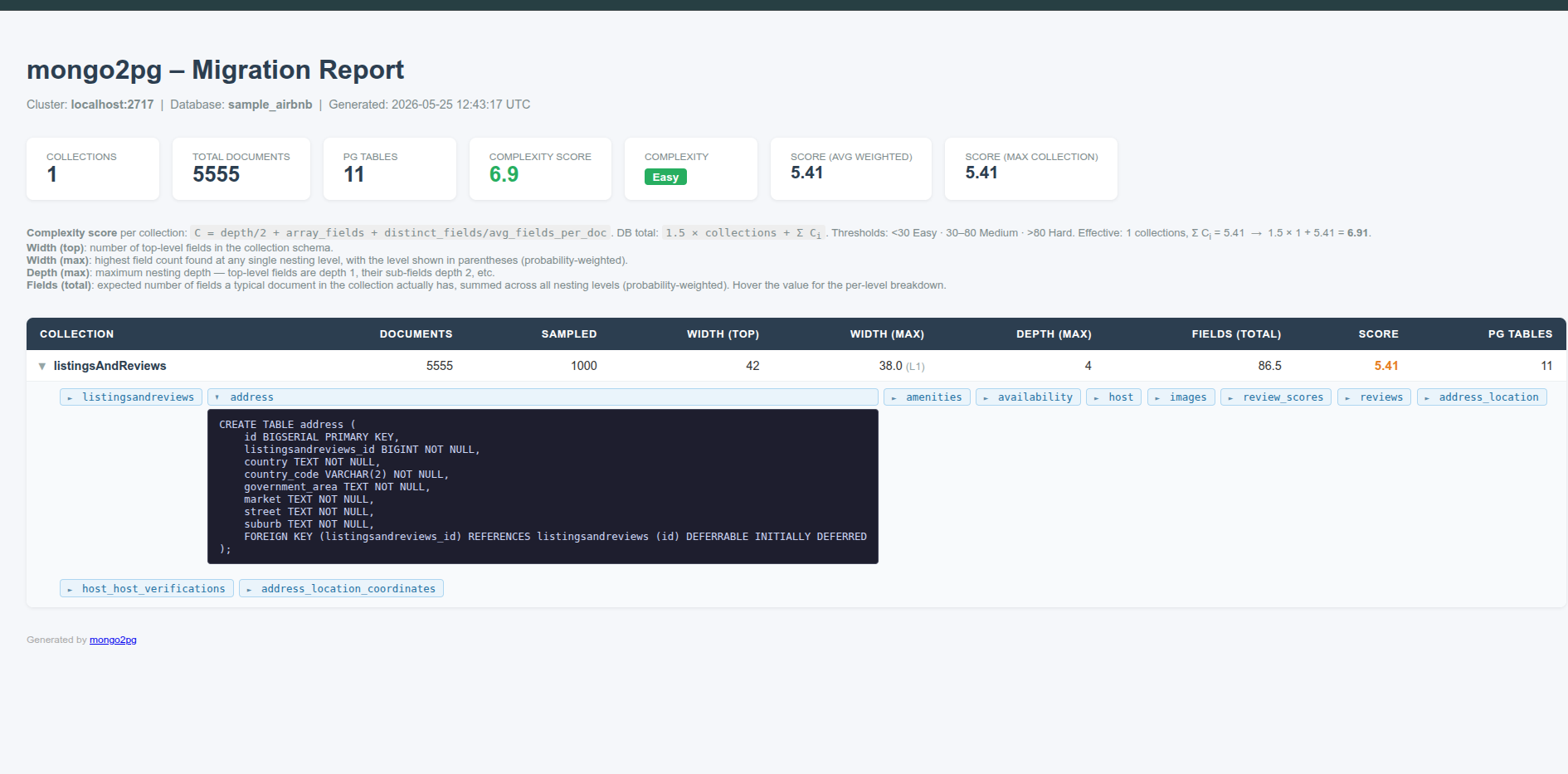
schema/tables/<db>/ - the main HTML report in
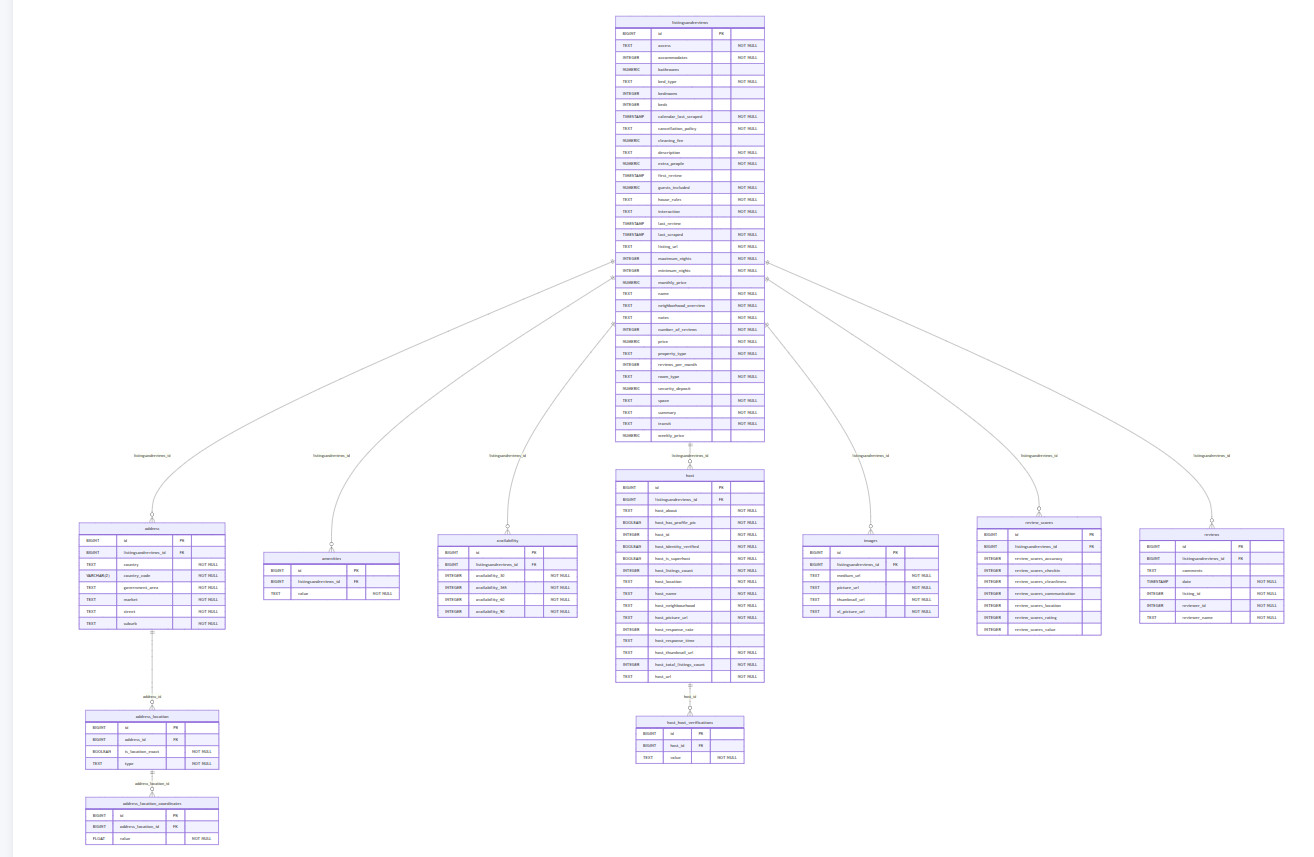
reports/main.html - schema diagrams in
reports/*.schema.html
output is
tables : 11
columns: 101
tables : 11
columns: 101
Inference summary
  Score: 6.85
  Collections: 1
  PostgreSQL tables: 11
  Detailed HTML report: docker_tutorial/sample_airbnb/reports/main.html
  Next step: review the generated DDL files under docker_tutorial/sample_airbnb/schema/tables and then run `mongo2pg export -c docker_tutorial/sample_airbnb/config/sample_airbnb.toml`
Maybe the table name, schema name or database options do not reflect your needs. You can modify those SQL files. They will be used during the next steps, generating export files.
For example, some table name can be over 64c, they should be renamed.
Step 3 — Export data as relational CSV files
mongo2pg export -c docker_tutorial/mycluster/config/mycluster.toml
Base on the existing SQL files in schema/tables/<db>/*.sql, it will connect to mongodb extract documents into zipped csv files.
This writes .csv.gz files under data/<db>/<collection>/, one per generated
PostgreSQL table.
[sample_airbnb.listingsAndReviews]
  5555 rows -> docker_tutorial/mycluster/data/sample_airbnb/listingsandreviews/listingsandreviews.csv.gz
  5555 rows -> docker_tutorial/mycluster/data/sample_airbnb/listingsandreviews/address.csv.gz
  121402 rows -> docker_tutorial/mycluster/data/sample_airbnb/listingsandreviews/amenities.csv.gz
  5555 rows -> docker_tutorial/mycluster/data/sample_airbnb/listingsandreviews/availability.csv.gz
  5555 rows -> docker_tutorial/mycluster/data/sample_airbnb/listingsandreviews/host.csv.gz
  5555 rows -> docker_tutorial/mycluster/data/sample_airbnb/listingsandreviews/images.csv.gz
  5555 rows -> docker_tutorial/mycluster/data/sample_airbnb/listingsandreviews/review_scores.csv.gz
  149792 rows -> docker_tutorial/mycluster/data/sample_airbnb/listingsandreviews/reviews.csv.gz
  5555 rows -> docker_tutorial/mycluster/data/sample_airbnb/listingsandreviews/address_location.csv.gz
  27600 rows -> docker_tutorial/mycluster/data/sample_airbnb/listingsandreviews/host_host_verifications.csv.gz
  11110 rows -> docker_tutorial/mycluster/data/sample_airbnb/listingsandreviews/address_location_coordinates.csv.gz
reports
This command creates a mycluster/reports/main.html where details are explained.
and also mycluster/reports/sample_airbnb.schema.html a graphical representation of the model
Step 4 — Load into PostgreSQL
Run:
mongo2pg import -c docker_tutorial/mycluster/config/mycluster.toml
This command connects to PostgreSQL using TARGET_URI, creates the database
if needed, executes the generated SQL files in schema/tables/<db>/, and then
decompresses every exported .csv.gz file and loads it with COPY.
It also regenerates reports/post_report.html automatically once the import
completes.
If you see constraint violations during this step, review the generated DDL,
adjust the affected NOT NULL constraints or table definitions, and then rerun
mongo2pg import -c ....
this import command will fail with
Caused by:
    0: db error
    1: ERROR: null value in column "reviewer_name" of relation "reviews" violates not-null constraint
       DETAIL: Failing row contains (66541, 19953862, Great place in a very central location. It made getting around t..., 2019-02-24 05:00:00+00, 19953862, 26317712, null).
This is because during infer command, 100 documents were read (sample=100 the default value). In those documents, reviewer_name was always present.
So in ddl file this colum reviewer_name has a not null constraint.
But it appears that on some document, sometimes reviewer_name is not present.
So you should modify the file mycluster/schema/tables/sample_airbnb/listingsandreviews.sql
find reviewer_name and remove the not null constraint.
Drop the previously created database and run again the import command (not the infer,it will overwrite the ddl files)
Created PostgreSQL database "sample_airbnb"
Created PostgreSQL objects from docker_tutorial/mycluster/schema/tables/sample_airbnb/listingsandreviews.sql
Imported 5555 row(s) into listingsandreviews.address from docker_tutorial/mycluster/data/sample_airbnb/listingsandreviews/address.csv.gz
Imported 5555 row(s) into listingsandreviews.address_location from docker_tutorial/mycluster/data/sample_airbnb/listingsandreviews/address_location.csv.gz
Imported 11110 row(s) into listingsandreviews.address_location_coordinates from docker_tutorial/mycluster/data/sample_airbnb/listingsandreviews/address_location_coordinates.csv.gz
Imported 121402 row(s) into listingsandreviews.amenities from docker_tutorial/mycluster/data/sample_airbnb/listingsandreviews/amenities.csv.gz
Imported 5555 row(s) into listingsandreviews.availability from docker_tutorial/mycluster/data/sample_airbnb/listingsandreviews/availability.csv.gz
Imported 5555 row(s) into listingsandreviews.host from docker_tutorial/mycluster/data/sample_airbnb/listingsandreviews/host.csv.gz
Imported 27600 row(s) into listingsandreviews.host_host_verifications from docker_tutorial/mycluster/data/sample_airbnb/listingsandreviews/host_host_verifications.csv.gz
Imported 5555 row(s) into listingsandreviews.images from docker_tutorial/mycluster/data/sample_airbnb/listingsandreviews/images.csv.gz
Imported 5555 row(s) into listingsandreviews.listingsandreviews from docker_tutorial/mycluster/data/sample_airbnb/listingsandreviews/listingsandreviews.csv.gz
Imported 5555 row(s) into listingsandreviews.review_scores from docker_tutorial/mycluster/data/sample_airbnb/listingsandreviews/review_scores.csv.gz
Imported 149792 row(s) into listingsandreviews.reviews from docker_tutorial/mycluster/data/sample_airbnb/listingsandreviews/reviews.csv.gz
Import completed for database 'sample_airbnb'.
report
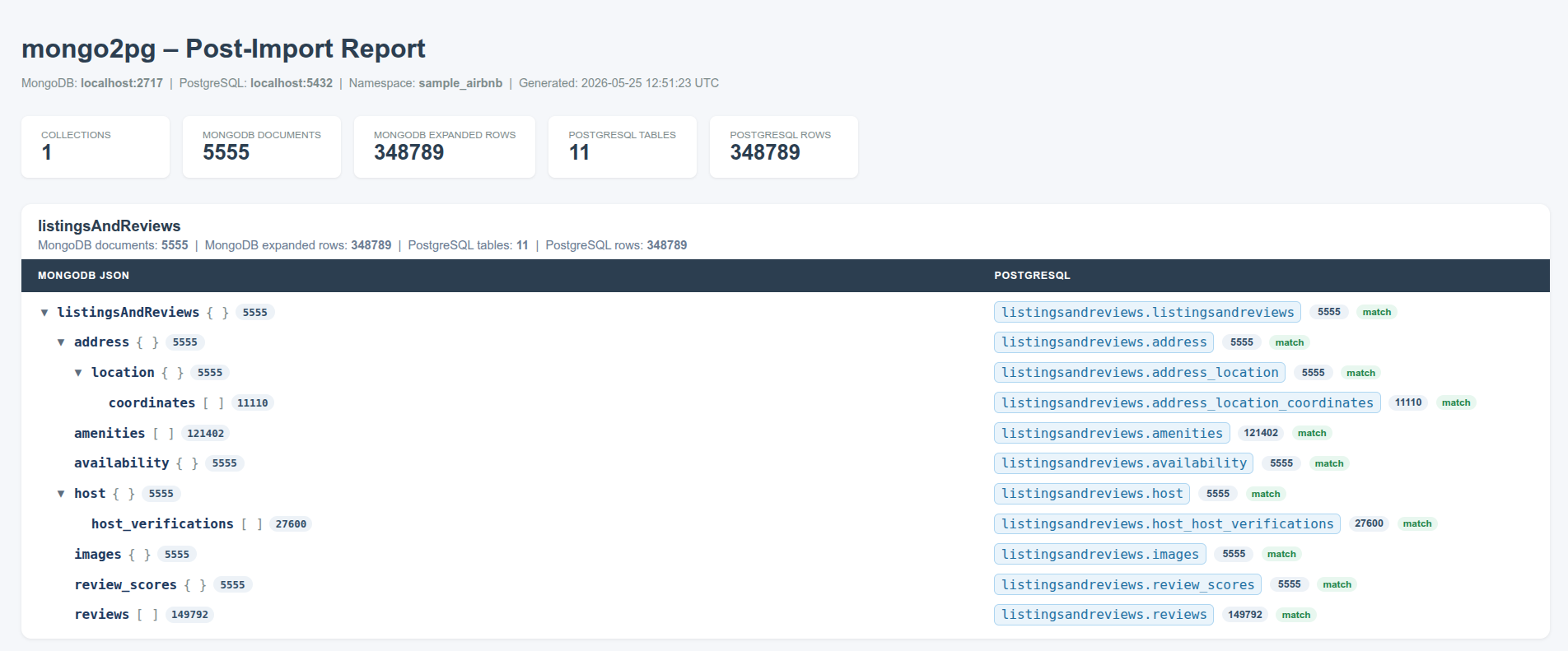
After loading the exported CSV data into PostgreSQL, open the automatically
generated report at reports/post_report.html.
If you need to rerun it manually after additional database changes, run:
mongo2pg report \
  -c docker_tutorial/mycluster/config/mycluster.toml \
  --post-import
This writes reports/post_report.html and compares:
- MongoDB top-level document counts
- MongoDB expanded nested occurrence counts
- PostgreSQL row counts per generated table
For nested nodes such as address, reviews, or address.location.coordinates,
the report shows the MongoDB occurrence count beside the matching PostgreSQL
table count so you can verify the relational expansion.